

Many business leaders assume their IT environment is secure because they have backups, antivirus, firewalls, and Microsoft 365.
Those are all important pieces. But having the right tools doesn’t always mean they’re configured correctly.
That matters because small configuration gaps can lead to bigger business problems: account compromise, email fraud, data exposure, insurance issues, compliance risk, and costly disruption.
If you’re using Microsoft 365, there’s a built-in way to measure that posture.
It’s called Microsoft Secure Score.
What Microsoft Secure Score actually is
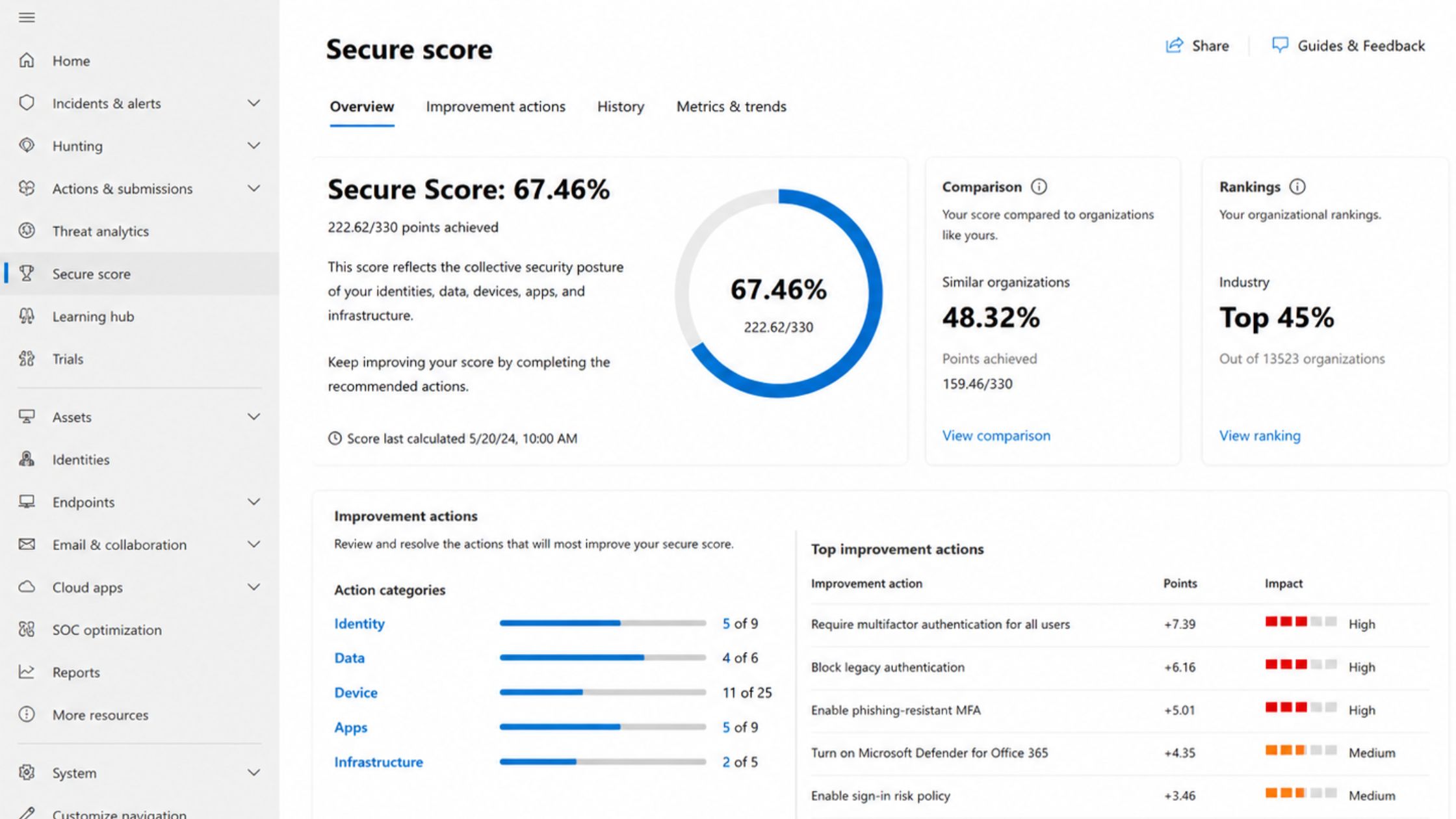
Microsoft Secure Score is a built-in tool in Microsoft 365 that evaluates how securely your environment is configured.
Think of it as a security health score for your Microsoft environment. It examines areas such as multi-factor authentication, identity protection, email security, device security policies, and data protection controls.
Based on those settings, Microsoft calculates a numerical score that reflects how well your environment aligns with recommended security practices. The higher the score, the stronger your security posture.
But the number itself isn’t the real value. It’s the visibility behind it.
Secure Score helps show where your environment is strong, where risk may be hiding, and which improvements could help reduce disruption before it happens.
What is a good Secure Score?
One of the most common questions people ask when they first see Secure Score is, “Is my score good or bad?”
The honest answer is that every environment is different.
In practice, many SMB environments we review initially fall within the 25–45% range of their potential Secure Score. That doesn’t necessarily mean the organization is doing something wrong. It usually means the environment was set up over time, with security features gradually added but not always fully configured.
With the right improvements, many organizations can move into the 65–80% range, which is typically where security teams aim.
The goal isn’t perfection or chasing a specific number. It’s continuous improvement, lower risk, and better operational stability.
In many environments, a few targeted configuration changes, such as enforcing MFA for all users or tightening email protection, can significantly raise the Secure Score. Sometimes in days rather than months.
What we typically find in a Secure Score review
A Secure Score review doesn’t need to be a long, technical exercise to be useful. Even a short review can surface issues that have direct business impact.
Here are three examples we often look for first when onboarding a new client:
MFA gaps
You may believe multi-factor authentication is fully enforced, but Secure Score can reveal that only some users are actually protected.
That gap matters because a single compromised password can expose email, SharePoint, Teams, and shared files. For an SMB, that can quickly turn into fraud risk, downtime, or a painful recovery process.
Risky admin accounts
Secure Score can also help identify accounts with elevated permissions that may lack sufficient protection.
Admin accounts are high-value targets. If one is compromised, the impact can extend across users, devices, data, and Microsoft 365 services. Reviewing these accounts helps reduce the risk that a minor credential issue becomes a major operational incident.
Weak email protections
Email remains one of the most common entry points for phishing, impersonation, and business email compromise.
Secure Score can highlight missing or incomplete email security settings, helping reduce the likelihood of fraudulent messages reaching users, invoices being redirected, or sensitive conversations being exposed.
A quick example
Secure Score often surfaces gaps that organizations didn’t realize existed.
We recently reviewed an environment where leadership believed multi-factor authentication was fully enforced. Secure Score revealed that only about 20 percent of users actually had it enabled.
From the outside, everything looked secure. In reality, most user accounts were still protected only by passwords.
That’s a significant exposure. A single compromised credential in that environment could have given an attacker access to email, SharePoint, and shared files without triggering any additional verification.
Many attacks succeed for exactly this reason. Not because companies lack security tools, but because basic protections were never fully configured.
That’s the kind of issue Secure Score helps identify quickly, before it becomes an incident.
Why many SMBs never look at it
Even though Secure Score is built into Microsoft 365, many businesses never review it.
They may not know it exists. They may not be sure what the recommendations mean. They may worry that changes could disrupt users. Or their IT provider may simply never bring it up.
That concern about disruption is understandable. Nobody wants security improvements to turn into a Monday-morning productivity crisis.
The good news is that many Secure Score improvements can be implemented gradually, with planning and minimal disruption to users. The key is knowing which changes matter most, what order to make them in, and how to communicate them to the team.
Without that ongoing review, gaps tend to sit quietly in the background while business risk remains hidden.
How we use Secure Score with our customers
At Third Octet, Secure Score is one of the operational signals we use to guide security improvements over time.
The score itself is useful, but its real value lies in regularly reviewing it and tying it to operational decisions.
Our role typically shows up in three ways.
As advisors, we help you understand which recommendations actually matter for your business, risk profile, and operational priorities.
As an operator, we implement the improvements in a planned way, so your team doesn’t have to spend time deciphering Microsoft security documentation or worrying about unexpected user disruption.
As an accountability partner, we review Secure Score regularly alongside other signals, such as identity risk alerts, endpoint protection status, and backup integrity. That helps ensure your environment keeps improving instead of quietly drifting backward.
Because security isn’t something you configure once and forget.
It’s something you continuously manage.
Curious what your Secure Score looks like?
If you’re using Microsoft 365, your environment already has a Secure Score. Many organizations just haven’t looked at it yet.
A brief review can quickly highlight where your Microsoft 365 security posture stands, which risks to address first, and which improvements could help reduce business disruption.
If you’re curious where your environment currently stands, we’re happy to run a quick Secure Score review and walk you through what we see.
No pressure. Just clarity about where your Microsoft 365 security posture stands and what may need attention. Start a conversation.
FAQs
Is Microsoft Secure Score included with Microsoft 365?
Yes. Secure Score is built into Microsoft 365, though access and visibility may depend on your licensing and admin permissions.
Will improving Secure Score disrupt our team?
Not if the work is planned properly. Some improvements may affect how users sign in or access systems, but many changes can be staged, tested, and communicated before rollout.
Is Secure Score enough to prove we’re secure?
No. Secure Score is a useful signal, not a complete security program. It should be reviewed alongside other areas, including identity risk, endpoint protection, backups, compliance needs, user training, and ongoing monitoring.


0 Comments