

Is your team ready to put AI to work?
Six months ago, many businesses turned on their Copilot licenses with real enthusiasm.
Today, a handful of people use it regularly, many have forgotten it’s there, and some SMB leaders aren’t quite sure whether that counts as “using AI.”
Almost every business owner or management team is talking about AI. Fewer have agreed on what it should accomplish, where it belongs in the business, or how employees are expected to use it.
That uncertainty follows the tool into the workplace. Some employees experiment on their own. Others avoid it or wait for clearer direction while the licenses sit unused.
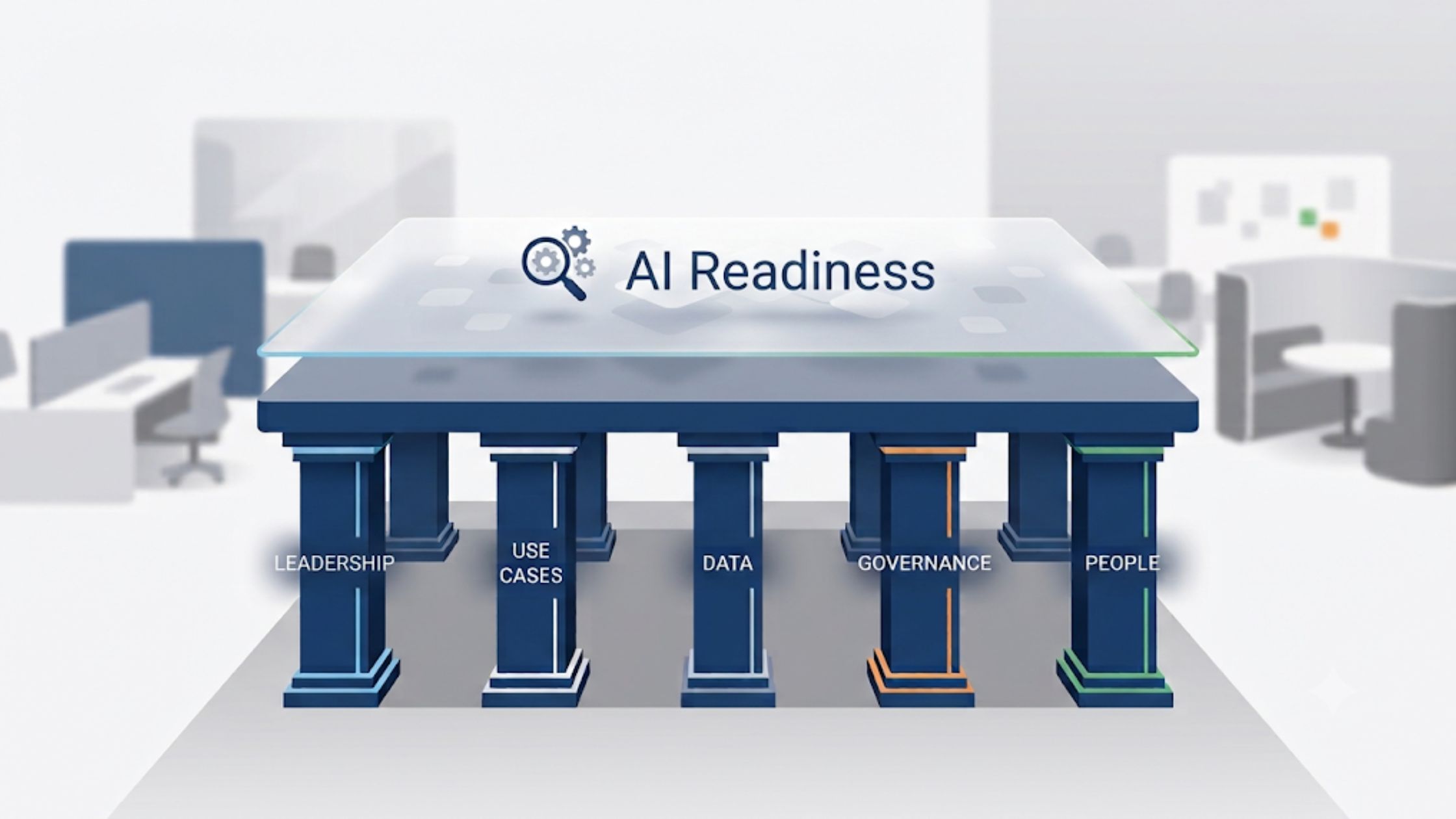
AI readiness shows up in the decisions and conditions around the technology. You know what you want to improve. Your employees understand what AI means for their work. A defined use case, appropriate safeguards, and a prepared Microsoft 365 environment support both.
You do not need every detail resolved before you begin. You do need enough alignment to give the rollout direction and enough trust for employees to take part.
Together, these five signals show whether your business is ready to move from AI interest to practical use.
Key takeaways
- AI readiness begins with a shared purpose that owners, managers, and employees understand.
- Start with one clearly defined use case tied to a real task or business problem.
- Employees are more likely to adopt AI when they have clear guidance, relevant training, and confidence in leadership’s intentions.
- Safe adoption also depends on clear ownership, appropriate rules, and a Microsoft 365 environment that can support the intended use.
- You do not need every condition perfected before you begin, but you should know which gaps need attention before introducing AI more widely.

Signal one: Leadership agrees on what AI is for
The first signal is alignment across the team, including the people managers responsible for putting those decisions into practice.
In a smaller business, that group might include the owner, general manager, operations lead, or team leads. The job titles matter less than whether the people setting priorities and guiding employees are giving the same direction.
They should be able to answer one question consistently:
What do we want AI to help us accomplish?
“We want to use AI” gives your team very little direction.
“We want AI to draft the first version of routine client emails so our team can spend more time responding to complex requests” gives people a practical place to start.
A clear purpose helps you make consistent decisions about tools, training, and where to begin. It also gives managers something concrete to reinforce with their teams.
Employees will turn to their manager with practical questions:
- Where does AI fit into my work?
- Which tasks are appropriate?
- Which parts still require my judgment?
- How will AI-assisted work be reviewed?
- Is this meant to reduce repetitive work, improve service, help us handle more work, or some combination of the three?
You do not need to predict every effect before getting started. The people guiding employees should understand the purpose, communicate it consistently, and address concerns before employees have to fill in the blanks themselves.
Without that clarity, AI becomes another tool looking for a problem while employees receive mixed signals about how seriously they should take it.
Signal two: You have a real, named use case
The second signal is specificity.
You can point to a workflow, task, or business challenge where AI has a defined job to do.
“Somewhere in the business” is too broad to guide a rollout. It gives your team no shared starting point and makes it difficult to tell whether the technology is helping.
A named use case is easier to explain, test, support, and evaluate.
Maybe AI can reduce the time employees spend drafting standard documents. It could help a service team prepare first responses to common questions or help people find approved information across a large collection of files.
Talk with the employees closest to that work before deciding how AI should fit. They know where delays occur, which exceptions matter, and where an AI-generated answer would still need careful review.
Their involvement also makes adoption more credible. The tool is being introduced in response to a problem the team recognizes, rather than a general request from management to “use more AI.”
A strong first use case identifies:
- the work being improved
- the people involved
- the role AI will play
- the decisions that remain with employees
- the result you expect to see
For a closer look at documenting a process before introducing AI or automation, see Before You Automate Anything, You Need to Do This First.
Signal three: Your data is organized enough to use safely
The third signal concerns the information AI may access.
Employees will form an opinion about AI quickly. If it returns an outdated policy, surfaces the wrong version of a document, or reveals information they did not expect to see, confidence can disappear early.
Before connecting AI to business data, you need reasonable confidence that your files, permissions, and access reflect how the business operates today.
Ask:
- Who owns important documents?
- Can employees identify the current version?
- Who has access to sensitive information?
- Does that access still make sense?
- Are important files stored where employees and approved tools can find them?
These questions existed before AI. The technology can simply expose the consequences of weak information management faster.
For a deeper review of permissions, information sprawl, security controls, and the Microsoft 365 environment underneath AI, see “We Use AI” Is the New “We’ve Moved to the Cloud.”
Signal four: Guardrails and ownership exist before the tool does
The fourth signal is clear responsibility.
Someone needs to guide the rollout, answer questions, review how the technology is being used, and decide when the business is ready to introduce it more widely.
That person does not need “AI” in their job title. In many SMBs, the responsibility may sit with an owner, operations lead, IT contact, or manager who already oversees the affected work.
Employees need to know:
- which AI tools are approved
- what information they can share
- when AI-generated work needs review
- where to bring questions or concerns
- how their feedback will shape what happens next
A policy can set the boundaries, but employees also need someone who can explain how those rules apply to their work.
Clear ownership prevents each manager or part of the business from creating its own approach. It also gives you a way to learn from early use, respond to problems, and adjust expectations as employees gain experience.
For a broader review of AI policies, acceptable use, access, and responsibility, see the Governance Gap Assessment.
Signal five: Your team trusts leadership enough to adopt it
The fifth signal is employee trust.
People are more likely to try AI when they understand why it is being introduced, how it may help, and what remains expected of them.
They are more likely to hesitate when the rollout arrives without explanation or when managers avoid questions about monitoring, performance, job security, and changing responsibilities.
Trust is built through the way you introduce the technology.
Employees notice whether you:
- ask for input from the people doing the work
- give them time to learn and experiment
- acknowledge that AI-generated work can be wrong
- respond constructively when an early attempt does not work
- explain how responsibilities or expectations may change
- apply the same rules across the business
Training should also go further than a product demonstration. Give people a relevant task to practice, examples of acceptable and unacceptable use, and a clear way to ask for help.
A technically sound rollout can still stall when employees do not feel informed or involved. Clear communication and honest answers give them a stronger reason to participate.
What happens when the signals are missing?
When AI readiness is missing, nothing dramatic usually happens.
The tool gets purchased. A few employees try it. Usage slows down.
Different parts of the business may develop their own practices. One manager encourages experimentation while another discourages it. Some employees paste information into unapproved tools because the approved option is unclear. Others avoid AI because they are unsure whether using it will be rewarded, questioned, or viewed as taking shortcuts.
The business ends up paying for technology without establishing a shared way to use it.
AI can also speed up a process that already has unclear ownership or inconsistent steps. The output arrives faster, but the disagreement or inefficiency underneath it remains.
Most businesses are not starting from zero. They usually have some of these signals in place and others that need attention. Reviewing them together helps you see whether the next step involves clearer direction, a better-defined process, more employee support, or the Microsoft 365 environment.
You do not need a perfect score to begin. You need enough clarity to choose a sensible next step.
If most of these signals are missing:
Bring the people setting direction together around the business outcome you want to improve. Talk with the employees closest to that work before selecting or introducing more tools.
If some signals are present:
Choose one meaningful use case and make sure someone is responsible for it. Start with one team, task, or workflow, then give people clear guidance, time to learn, and an easy way to share what is and is not working.
If most signals are present but data or oversight is the concern:
Review whether your Microsoft 365 environment, permissions, information controls, and internal rules can support the use case safely.
Missing a signal or two is normal. Recognizing which conditions need attention can prevent small gaps from becoming harder to manage once more employees begin using AI.
The honest next step
A secure and well-managed technology environment supports AI adoption. So do aligned managers, clear use cases, visible ownership, and employees who understand what the change means for their work.
Before introducing more AI, consider:
- Can the people leading the business explain what we want it to accomplish?
- Have we spoken with the employees whose work will be affected?
- Do people know which tools and information are approved?
- Is someone clearly responsible for the rollout?
- Can our Microsoft 365 environment support the intended use safely?
Your answers should point toward the next practical step, whether that involves clearer direction, input from employees, process work, internal rules, or a technical readiness review.
If your purpose and approach are clear but you are unsure whether your Microsoft 365 environment is ready for Copilot, our Copilot Readiness Assessment can help answer that part of the question.
We review how your environment is configured, identify potential gaps, and explain the findings in plain language: what is ready, what needs attention, and what to address before you introduce Copilot to more of the business.



0 Comments